New feature in AstroPaper v1.4.0, introducing dynamic OG image generation for blog posts.
AstroPaper v1.4.0 中的新功能,介绍博客帖子的动态 OG 图像生成。
Table of contents
Open Table of contents
Intro
介绍
OG images (aka Social Images) play an important role in social media engagements. In case you don’t know what OG image means, it is an image displayed whenever we share our website URL on social media such as Facebook, Discord etc.
OG 图像(又称社交图像)在社交媒体参与中扮演重要角色。如果你不知道 OG 图像是什么意思,它是每当我们在社交媒体如 Facebook、Discord 等上分享我们的网站 URL 时显示的图像。
The Social Image used for Twitter is technically not called OG image. However, in this post, I’ll be using the term OG image for all types of Social Images.
用于 Twitter 的社交图像技术上不叫 OG 图像。然而,在这篇文章中,我将使用 OG 图像这个术语来指所有类型的社交图像。
Default/Static OG image (the old way)
默认/静态 OG 图像(旧方式)
AstroPaper already provided a way to add an OG image to a blog post. The author can specify the OG image in the frontmatter ogImage. Even when the author doesn’t define the OG image in the frontmatter, the default OG image will be used as a fallback (in this case public/astropaper-og.jpg). But the problem is that the default OG image is static, which means every blog post that does not include an OG image in the frontmatter will always use the same default OG image despite each post title/content being different from others.
AstroPaper 已经提供了一种为博客帖子添加 OG 图像的方法。作者可以在 frontmatter ogImage 中指定 OG 图像。即使作者没有在 frontmatter 中定义 OG 图像,默认 OG 图像也将用作后备(在这种情况下 public/astropaper-og.jpg)。但问题是默认 OG 图像是静态的,这意味着每个博客帖子如果没有在 frontmatter 中包含 OG 图像,将总是使用相同的默认 OG 图像,尽管每个帖子的标题/内容与其他不同。
Dynamic OG Image
动态 OG 图像
Generating a dynamic OG image for each post allows the author to avoid specifying an OG image for every single blog post. Besides, this will prevent the fallback OG image from being identical to all blog posts.
为每个帖子生成动态 OG 图像允许作者避免为每个博客帖子指定 OG 图像。此外,这将防止后备 OG 图像与所有博客帖子相同。
In AstroPaper v1.4.0, Vercel’s Satori package is used for dynamic OG image generation.
在 AstroPaper v1.4.0 中,Vercel 的 Satori 包用于动态 OG 图像生成。
Dynamic OG images will be generated at build time for blog posts that
动态 OG 图像将在构建时为以下博客帖子生成
-
don’t include OG image in the frontmatter
-
没有在 frontmatter 中包含 OG 图像
-
are not marked as draft.
-
没有标记为草稿。
Anatomy of AstroPaper dynamic OG image
AstroPaper 动态 OG 图像的剖析
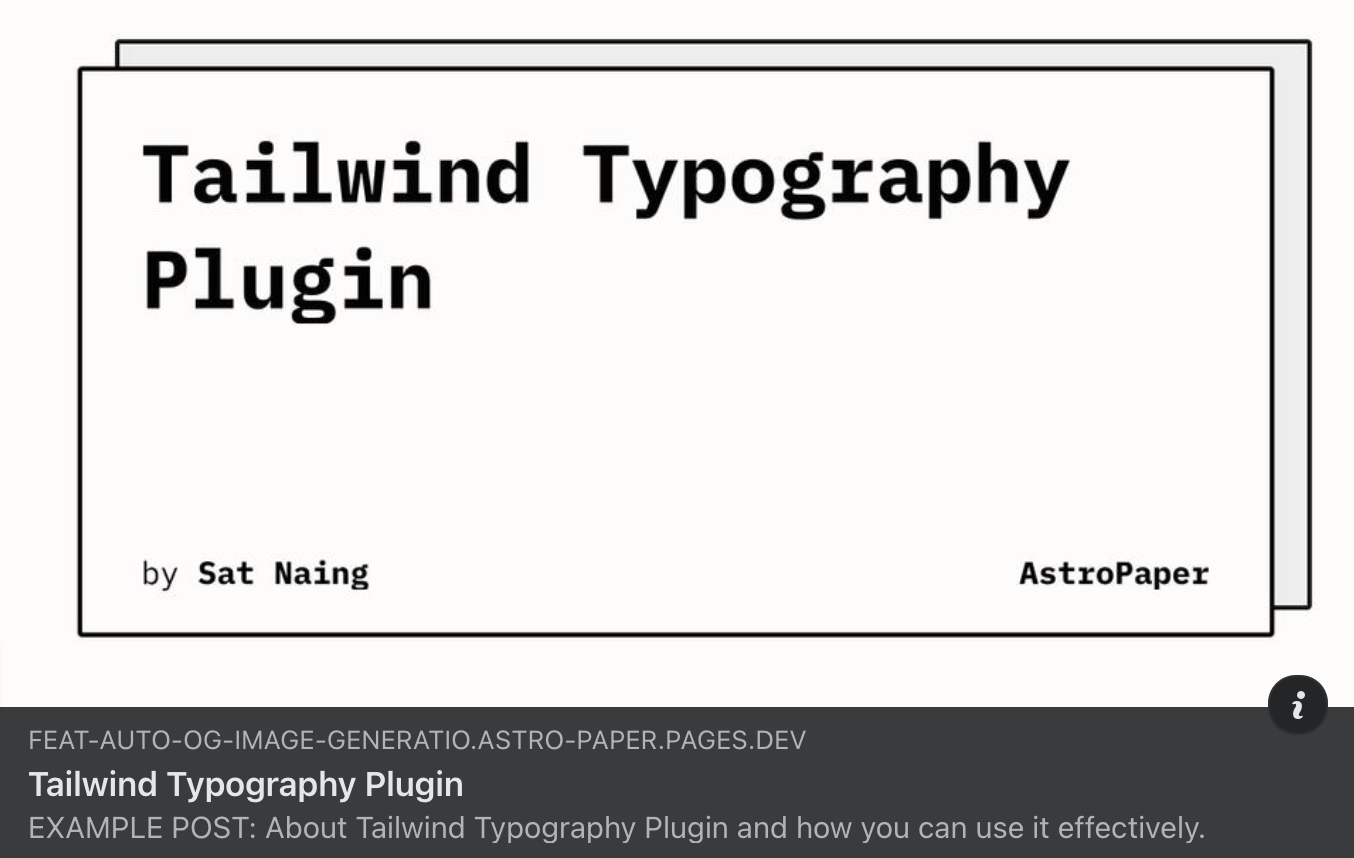
Dynamic OG image of AstroPaper includes the blog post title, author name and site title. Author name and site title will be retrieved via SITE.author and SITE.title of “src/config.ts” file. The title is generated from the blog post frontmatter title.
AstroPaper 的动态 OG 图像包括 博客帖子标题、作者姓名 和 站点标题。作者姓名和站点标题将通过 “src/config.ts” 文件的 SITE.author 和 SITE.title 检索。标题是从博客帖子 frontmatter title 生成的。
Issue Non-Latin Characters
非拉丁字符问题
Titles with non-latin characters won’t display properly out of the box. To resolve this, we have to replace fontsConfig inside loadGoogleFont.ts with your preferred font.
带有非拉丁字符的标题不会开箱即用地正确显示。要解决这个问题,我们必须用您喜欢的字体替换 loadGoogleFont.ts 中的 fontsConfig。
async function loadGoogleFonts(
  text: string
): Promise<
  Array<{ name: string; data: ArrayBuffer; weight: number; style: string }>
> {
  const fontsConfig = [
    {
      name: "Noto Sans JP",
      font: "Noto+Sans+JP",
      weight: 400,
      style: "normal",
    },
    {
      name: "Noto Sans JP",
      font: "Noto+Sans+JP:wght@700",
      weight: 700,
      style: "normal",
    },
    { name: "Noto Sans", font: "Noto+Sans", weight: 400, style: "normal" },
    {
      name: "Noto Sans",
      font: "Noto+Sans:wght@700",
      weight: 700,
      style: "normal",
    },
  ];
  // ...
}src/utils/loadGoogleFont.ts
Check out this PR for more info.
查看 此 PR 以获取更多信息。
Trade-off
权衡
While this is a nice feature to have, there’s a trade-off. Each OG image takes roughly one second to generate. This might not be noticeable at first, but as the number of blog posts grows, you might want to disable this feature. Since every OG image takes time to generate, having many of them will increase the build time linearly.
虽然这是一个不错的功能,但有一个权衡。每个 OG 图像大约需要一秒钟来生成。这一开始可能不明显,但随着博客帖子数量的增加,您可能想禁用此功能。由于每个 OG 图像都需要时间来生成,有很多这样的图像将线性增加构建时间。
For example: If one OG image takes one second to generate, then 60 images will take around one minute, and 600 images will take approximately 10 minutes. This can significantly impact build times as your content scales.
例如:如果一个 OG 图像需要一秒钟来生成,那么 60 个图像将需要大约一分钟,600 个图像将需要大约 10 分钟。这可以随着您的内容扩展而显著影响构建时间。
Related issue: #428
相关问题:#428
Limitations
限制
At the time of writing this, Satori is fairly new and has not reached major release yet. So, there are still some limitations to this dynamic OG image feature.
在写这篇文章时,Satori 相当新,还没有达到主要发布。所以,这个动态 OG 图像功能仍然有一些限制。
-
Besides, RTL languages are not supported yet.
-
此外,RTL 语言还不支持。
-
Using emoji in the title might be a little bit tricky.
-
在标题中使用 emoji 可能有点棘手。